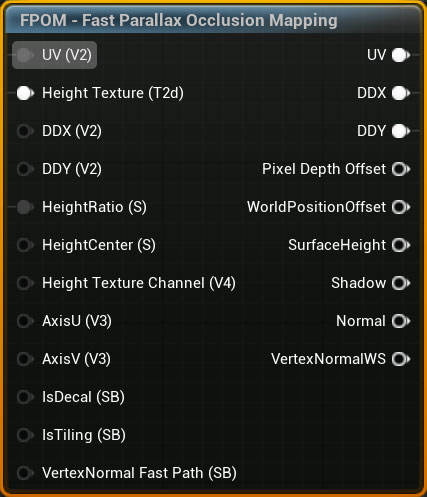
Inputs
UV
- Type:
UV - Default:
Texture Coordinate of UV 0
Height Texture
- Type:
Texture Object(Required) - Note: For packed textures use the
Height Texture Channelpin to set which channel holds the height texture
DDX
- Type:
float2 - Default:
ddx(UV) - Note: UV/DDX/DDY needs to be in sync. Use
FPOM - UV Derivatives Debug Helperto debug if the projection looks wrong.
DDY
- Type:
float2 - Default:
ddy(UV) - Note: UV/DDX/DDY needs to be in sync. Use
FPOM - UV Derivatives Debug Helperto debug if the projection looks wrong.
HeightRatio
- Type:
float - Default:
0.08
HeightCenter
- Type:
float - Default:
0.5 - Options: Value from
0to1.
0 means the parallax starts at the surface and grows down, 1 means it starts at the surface and grows up. 0.5 means the growth is evenly split up and down.
Height Texture Channel
- Type:
float4 - Default:
1,0,0,0
A channel mask (for example (1, 0, 0, 0) for red) selecting which channel of the heightmap texture holds the height data. Use this when the height is packed into a spare channel of an existing texture.
IsDecal
- Type:
Static Bool - Default:
false
A static bool signaling if the function is used on a decal.
IsTiling
- Type:
Static Bool - Default:
true
A static bool signaling if the height texture lookup should wrap or clamp. This value is always false if IsDecal is true.
Vertex Normal Fast Path
- Type:
Static Bool - Default:
false
FPOM uses scale corrected vertex normals. This switch does that on the vertex shader. This is off by default since it's not compatible with landscape materials.
Advanced
AxisU
AxisV
Outputs
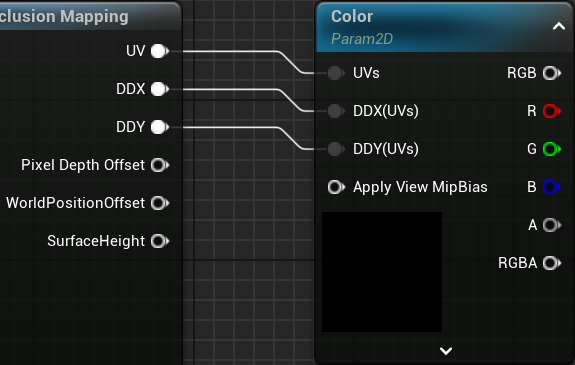
UV/DDX/DDY
It's important to always hook up UV, DDX and DDY to ensure correct MIP sampling and Anisotropic Filtering
UV
- Type:
UV
DDX & DDY
- Type:
float2
Set MipValueMode on your Texture Samples to Derivative to enable the DDX/DDY inputs.
Optional
Pixel Depth Offset
- Type:
float - Note: Virtual Shadow Maps tends to self-shadow incorrectly when PDO is used.
Used to set PDO in the material output to make the surface look more 3D when intersecting with other objects.
WorldPosition Offset
- Type:
float3
Used to offset the world position when using FPOM on a RVT landscape.
SurfaceHeight
- Type:
float - Returns:
0(bottom) to1(top)
Used to drive effects like fake AO in holes, water, etc.
Shadow
- Type:
float - Returns:
0(In shadow) to1(Not in shadow)
Used to drive fake self shadow effect. Can be used to multiply with base color for example.
Note: This value is calculated from the sunlight vector. It does not know if anything else is already occluding it, or any other local lights.
Normal
- Type:
World Space Normal - Returns: A normal derived from the height texture.
Used alone as a normal map, or together with a normal map texture doing Combined Normals.
VertexNormalWS
- Type:
VertexNormalWS - Returns: Return the scale corrected VertexNormalWS. Used when doing Combined Normals.